Note: You should noindex /amp/ pages first.
Do you want to redirect AMP permalink to the Non-AMP URL? This guide is going to help you.
You might know well, Twitter has also started serving AMP pages. Therefore, using redirection is very important to prevent from 404 hits for old AMP WordPress permalink. After deactivating the plugin, you will receive Error 404 for all AMP permalinks.
To fix this problem, you need to setup a redirect from the AMP to NON-AMP(canonical) URL.
- Go to Yoast SEO Plugin > Tools > File Editor
- In the .htaccess field add AMP to Non-AMP path redirection rule
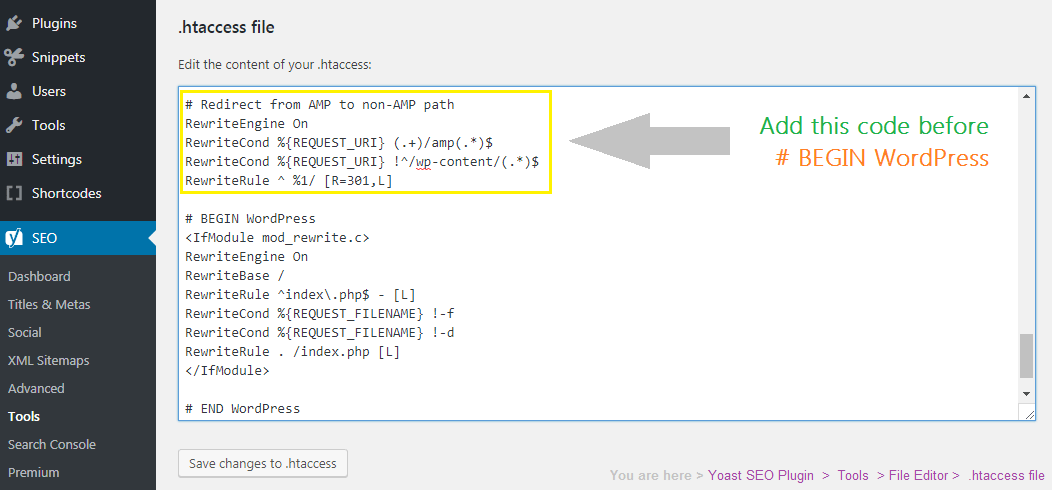
- and Save changes
# Redirect from AMP to non-AMP path
RewriteEngine On
RewriteCond %{REQUEST_URI} (.+)/amp(.*)$
RewriteCond %{REQUEST_URI} !^/wp-content/(.*)$
RewriteRule ^ %1/ [R=301,L]
Important changelog IST 3:15 PM 5/11/2017
* Excluded wp-content, concerning images which may contains ‘amp’ in the name.
What if you don’t have control to .htaccess?
Alternatively, you can also prevent 404 by doing a redirect from AMP to non-AMP path (canonical) pages using a free plugin called “Redirection“.
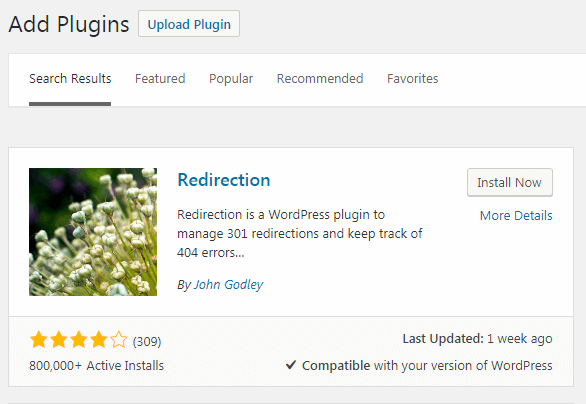
- Install a free plugin called “Redirection“
- Go to WordPress Dashboard > Tools > Redirection
- Add a new 301 Redirection
- Keep source
/(.*)\/amp - Target URL
https://www.yourdomain.com/$1
Kindly note: These steps should be implemented after disabling/noindexing AMP properly.
How can I redirect AMP URLs to the Canonical version in NGINX?
location ~ /amp/?$ { rewrite ^(.*/)amp/?$ $1 permanent; }
Where I can find the .htaccess file?
On the Apache server, the .htaccess file is usually located in the public_html directory. You can also use the Yoast file editor or the WP file management plugin.
Which method should I use .htaccess or redirection?
If you are using an Apache web server, use .htaccess. Otherwise the plugin way is simple.
Search Console still showing 404
Search Console may take some time to update the data. Wait a few days and check again.
I hope this guides helps in fixing 404 for AMP URLs. If you have any specific query, please feel free to ask. Thanks!

Sir, if amp pages are removed from search results after no indexing, will they be redirected to non-amp pages or will non-amp pages be ranked separately?
*after no indexing or redirection process, as mentioned in your article.
Once AMP pages are no-indexed completely, OPTIONALLY you can make a choice to redirect from AMP to Non-AMP pages to avoid 404. I have provided snippet for it in the article.
My AMP pages are now properly deindexed. But, my non-amp pages are also deindexed by Google, all of my pages in search results are now disappearing. Should I wait for some time for reindexing of non-amp pages or is this an error? I have followed all the steps correctly according to your article.
Please make sure you have followed this step where I have said removing
rel="amphtml"apart from setting noindex of AMP pages.Yes, I have followed this step by enabling the dev mode in ampforwp plugin as you said in your article.
Hello
Apke batai hui method pe Mein AMP ko delete kiya or uske baad meri Google Search Console account mein or ek error ayya “Reference Amp url is not an Amp” (https:/eample.com/url/to/amp/document.html) ye error arrahihe Gulshan bhai please bataye eshe kaise solve karun.
Google mein aphi ese mile jisne AMP remove karneka solution essay method se bataya
Thank you
1. First, noindex AMP pages
2. Then after few weeks you shall do redirect.
I’ve tried this Regex Rule: Source
/(.*)\/?ampand Targethttps://www.mysite.com/$1and it seems that it is working. What do you mean?Greetings Kathrin
Hai Gulshan I need your suggestion.
Now my amp posts are not showing up in google.com when checked using this format with my blog /*/amp/ , but in google search console it shows I valid post.
Can I deactivate the ampforwp plugin and delete it.
As far as for setting up redirect to avoid 404 errors I can add this code to my rank math plugin .htacess editor right.
# Redirect from AMP to non-AMP pathRewriteEngine On
RewriteCond %{REQUEST_URI} (.+)/amp(.*)$
RewriteCond %{REQUEST_URI} !^/wp-content/(.*)$
RewriteRule ^ %1/ [R=301,L]
But I don’t know whether my server is Nginx or not , I am using sitegrounds managed wordpress gogeek hosting plan. So please help me out now I am seeing lots of 404 redirections in wp admin. Thank You for your time.
You can set redirect now.
Hi Bro,
Actually, I have done everything with your method, within some time error gone from the AdSense. Yesterday I disabled Find and Replace plugin.
Today, when I open my adsense, account its showing. I tried to open my home page like http://www.jiofiber.in/amp ist showing.
But if i open my post with amp version, then my all post are opening. What is the issue can you tell me, please.
Currently, I am not able to open AMP version of this site.
Hey Gulshan,
How are you? It’s been a long time.
I have a quick question. I am using AMP on my website. In that case, should I optimize my default mobile pages also for speed? Will there be any impact?
Hi, gulshan
I wish, I got your good piece of article before. But unfortunately, I deactivated the amp for wp plugin without disabling/noindexing AMP properly. Now what i can do about the amp pages that shows 404. Should I do redirection or google will take them out after some time.
Thanks.
If your AMP pages are still present in Google SERPS, then install AMP for WP first and noindex it properly. Then, after few weeks when all AMP pages goes from SERPs, then set redirect.
Hey, gulshan thanks for this informative article. Iam having problem with 404 after disabling amp plugin. I have Followed each and every steps carefully but still having lots of 404 errors on webmaster. Plz help
If i use Redirection plugin, then i have to select regex option too ?
Hello Arvind, Yes, it’s required in that case.
Hey Gulshan,
I have already redirected all amp errors via the yoast redirect plugin. I heard that redirecting the 404 errors to my homepage is not the best idea but I have already done it. Should I do the .htaccess method as well? Should I also delete the redirects if I do the .htaccess option? What do you recommend I do?
Using above redirection rule, You should redirect AMP to non-AMP pages, not every URLs to homepage.
Will using the .htaccess be enough to get rid of the amp errors? I did that and deleted the redirects. Is that okay to do or will the errors come back?
Hi,
Your code is working fine for posts AMP URLs but not for home page. When I am going to
https://example.com/amp, it’s redirecting tohttps://example.com/amp/However, if post AMP URL is
https://example.com/post-name/ampthen it’s properly redirecting tohttps://example.com/post-name.How do I fix the home page redirect issue?
Please try this code.
RewriteRule ^amp/$ /? [L,R=301]Thanks
Hello Sir,
I have just deactivated amp plugin but I got trouble
How to solve this
I’d like to redirect domain.com/posting/?nonamp=1 to domain.com/posting/
Thanks
Hi, I love this except when I test links to my site from SERPS it still takes me to the AMP version of the page. i.e. the URL is actually pointing to a Google server such as https://google.com/amp/s/mypagepath. Is this just because I need to wait until Google de-indexes the AMP version and restores the versions of my pages that point to my server?
It seems you accidentally deactivated plugin, you shouldn’t. Please read my post again.
Thanks a lot, Gulshan. You have helped me a lot. Thanks
Hello dear,
I am so glad it was helpful. Thanks a lot for your comment.
thank you very much for such a wonderfull information, sir
this is 100% working solution
# Redirect from AMP to non-AMP path

RewriteEngine On

RewriteCond %{REQUEST_URI} (.+)/amp(.*)$

RewriteCond %{REQUEST_URI} !^/wp-content/(.*)$

RewriteRule ^ %1/ [R=301,L]
how many days this code need to be place there
as i am not using AMP further
As long, you want to redirect AMP visitor to normal pages, to avoid 404.
If you are using Yoast Plugin, just enter the fix provided here in the advanced redirect section of Yoast and it works like charm
Sorry I was referring to the plugin Real-Time Find and Replace, I should’ve asked this question on the previous page. My mistake.
Hi Gulshan!
I read your post but I got a little stuck where you show the .htaccess field because mine looks different than yours, mine starts as follows:
# Use PHP56 Single php.ini as default
AddHandler application/x-httpd-php56s .php
# BEGIN W3TC Browser Cache
Do you think it’ll still work?
The other question is what you mean when you put:
Important changelogs IST 3:15 PM 5/11/2017
* Excluded wp-content path concerning images which may contain ‘amp’ in the name.
Would you please explain what that means? Do we have to do something else with that info?
Thank you! I really appreciate your help!
Hi,
Thanks for the comment. Let me explain you in the detail. When I had written “AMP to non-AMP redirect” code for the first time, it was
# Redirect from AMP to non-AMP pathRewriteEngine On
RewriteCond %{REQUEST_URI} (.+)/amp(.*)$
RewriteRule ^ %1/ [R=301,L]
But after few months, I noticed that some of my images with file name “amp” were not loading.
That’s why, I decided to exclude wp-content path completely.
So, as per my current knowledge, below code is correct and it should work for you.
# Redirect from AMP to non-AMP pathRewriteEngine On
RewriteCond %{REQUEST_URI} (.+)/amp(.*)$
RewriteCond %{REQUEST_URI} !^/wp-content/(.*)$
RewriteRule ^ %1/ [R=301,L]
Here,
RewriteCond %{REQUEST_URI} !^/wp-content/(.*)$means redirection is excluded for static files of wp-content. path.I had forget to update my screenshot after updating this thing in the changelogs.
Thanks for reminding. Due to your question, I felt encouraged to update the screenshot.
Feel free to use this code, it should work for you. You should add this code just above # BEGIN W3TC Browser Cache since you are using a Cache plugin.
If you have any more queries, please feel free to ask.
Thanks & Regards,
Gulshan
Thank Gulshan! I am not very tech about stuff like this. Do you think this system works no matter what type of plugins a website has installed ( I mean compatibility) or the type of robot.txt someone has set up?
As I don’t know much about this stuff I want to be sure I won’t screw my site even more lol. A girl put that AMP plugin on my website saying it would help with my ranking and it was worse! all the tables on my website look completely wrong.
Thanks Gulshan!
Hi dear,
Just for removing AMP from Google, kindly note – Following above tutorial is not required, as I said in my last article
https://www.gulshankumar.net/remove-amp/. Above mentioned step is completely optional. Please check my last article if you have missed reading it.
Thanks
Hi Bro,
Shall I know its rewrite the .htaccess files are best or we need to use the redirect plugin?
Which option is the best bro?
Can you share the opinion bro?
Thank you
I would recommend using .htaccess method for redirecting from AMP to Non-AMP permalinks. It is safe.
Hi Gulshan,
Thanks for sharing this useful info on rectifying the AMP page errors on how to remove 404 error pages after disabling the AMP plugin
Please post about more amp errors like user modified javascript errors and user modified css types of amp errors, I am struggling to rectify them, my webmaster reports are flooded with this errors.
Thanks in advance!!